


Tick the papers you sit and each carries the share your syllabus gives it, so every grade is priced in marks you still have to get.
THE ONE-STOP SHOP FOR EXAM REVISION
Know exactly what to revise today.
Momentum loads your exam board’s own syllabus, puts a date on every spec point, and picks the ones that fit the time you actually have today.
Then practise with past papers, questions by chapter and timed mocks
Free for A Level, IGCSE, IB and SPM students. No card, no trial, no limits — and setup takes about a minute.

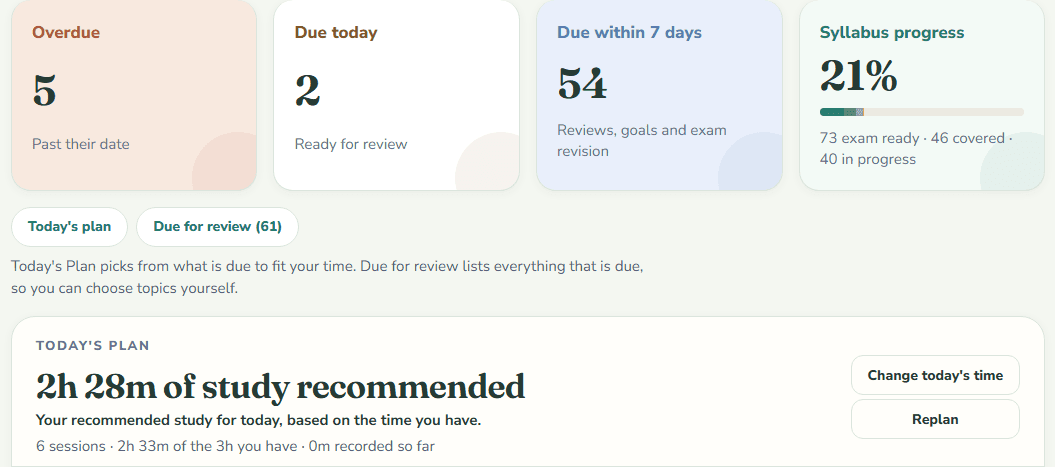
- OverdueWhat slipped. Start here.
- Due todayWorked out before you opened it.
- Due within 7 daysReviews, goals and exam revision in one queue.
- Syllabus progressMeasured against the board's own spec points.
9exam boards
455syllabuses loaded in full
29,081spec points parsed
49,170past papers to sit
Cambridge International · Edexcel · AQA · OCR · IB Diploma · AP · SAT · ACT · SPM — 656 subjects to pick from, 39,129 of the papers come with a mark scheme, and 186,507 past-paper questions are filed by chapter.
TODAY'S PLAN
Say how long you have. Get that much to do.
Everything due across your subjects — reviews, new material from your plans, tasks, papers — is ranked and then cut to the minutes you have today. Deadlines first, then the points your next exam covers, then what is most overdue. Related points are grouped into short sessions, and what does not fit is said out loud rather than quietly dropped.
- One budget for every subject, set day by day
- Finish it and the day is done — no catch-up gate
- Miss a day and tomorrow keeps the same minutes


REVIEW BOARD
And the whole queue behind it
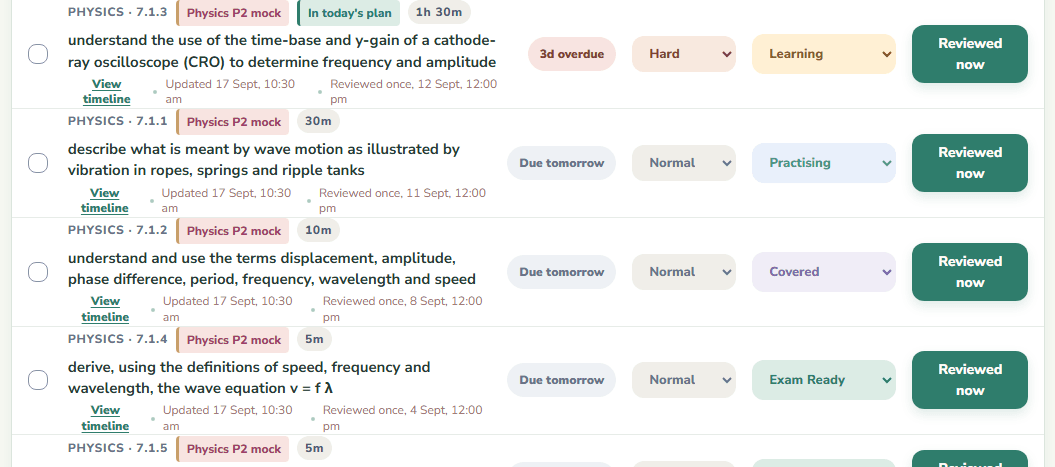
The plan picks from the board; the board keeps everything. Every spec point carries the date it comes back, how long it is worth, and what asked for it — the review schedule, a finish plan, or an exam that covers it. Nothing falls off the syllabus because you forgot it was there.
- Reviews, goal work and exam revision in one queue
- Rate one hard and it comes back sooner; easy, and it waits
- Narrow it to one subject, or search the whole syllabus

WHERE IT SITS
Keep what you study from. Momentum decides what needs studying.
It is not a replacement for your textbook or your teacher’s slides. It is the layer above them — the one that says which to open tonight, puts what your last paper got wrong back in the queue, and hands you the past-paper questions on it.
| What it does | A planner or calendar | A revision-notes site | Momentum |
|---|---|---|---|
| Your exam board's syllabus, loaded for you | You type it in | To read | To revise, with dates |
| Schedules individual spec points | No | Not usually | Yes |
| Brings a topic back on its own | No | Sometimes | Yes |
| Cuts the day's work to the time you have | You do that | No | Yes |
| Plans a mock covering only part of the course | Not usually | Not usually | Yes |
| Ties a lost mark to the spec point behind it | No | Not usually | Yes |
| Rates a paper by where its boundaries landed | No | No | Yes |
| Logging your hours moves the plan | No | No | Yes |
| Notes and videos | No | Yes | Bring your own |
| Past-paper questions by chapter, with their mark schemes | No | Sometimes | Yes |
PRELOADED SYLLABUSES
A percentage that actually means something
Your subjects arrive with the exam board's own chapters and spec points, in order. So 58% covered means 58% of the syllabus — not 58% of a list you wrote yourself.
- Cambridge, IB, Edexcel, AQA, OCR, AP and SPM
- Nothing to type in: pick the subject, get the syllabus
- Or bring your own by pasting an outline

PAST PAPERS
Stop recording the score. Find out where the marks went.
78.8% is the number every tracker will give you, and there is nothing you can do with it. Log the attempt against the spec points that lost the marks and they are ranked by how many papers they have cost you — usually the same three — then go straight back on the review board. Nine boards’ papers are here too, on one screen: Cambridge, AQA, OCR and Edexcel papers, most of them rated by where their grade boundaries actually landed, the AP released exams, the IB Diploma by session and timezone, SPM’s actual and trial papers, and the College Board’s and ACT’s own practice tests.
- Weak topics tagged to the syllabus point that lost them
- Difficulty read from the paper's own grade thresholds
- Cambridge, AQA, OCR, Edexcel, AP, IB, SPM, SAT and ACT on one screen


QUESTIONS BY CHAPTER
Every question on a chapter. Then a mock built from them.
Past-paper questions from Cambridge, Edexcel, AQA, OCR, the IB Diploma and SPM, cut whole from the papers and filed under the syllabus chapter they examine. Pick a chapter and every question on it is there, most with their own block of the mark scheme — for multiple choice, just the letter — and a star to keep the ones worth coming back to. Then build a mock from the chapters you choose: the number of questions and the time you set, sat a page at a time, with the scheme a click away and both saved as PDFs.
- Filed by syllabus chapter, most with their own mark scheme
- A timed mock drawn from the chapters you choose
- Star questions, open the scheme mid-paper, print it as a PDF


THE LOOP
Set it up once. After that it is the same three moves.
Nobody starts by logging time. You start by saying what you study — and from then on it is the app holding the plan, not you.
Setuponce
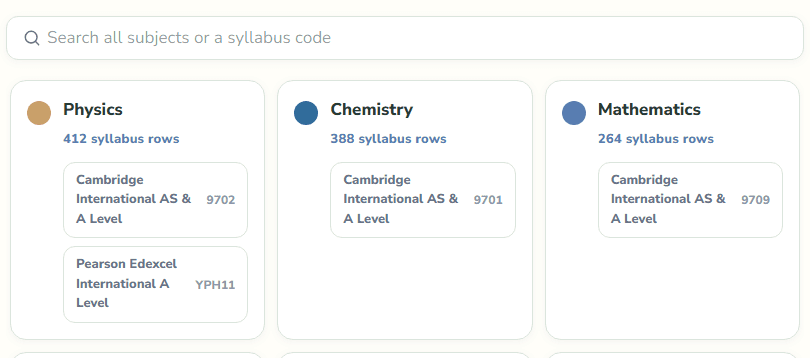
Pick your subjectsThe syllabus comes with them: the exam board's own chapters and spec points, in order, already scheduled. This is the whole of the setup, and it takes about a minute.
Step 1
Open the boardOverdue first, then what is due today. The list was worked out before you got there, so the session starts with studying rather than with deciding what to study.
Step 2
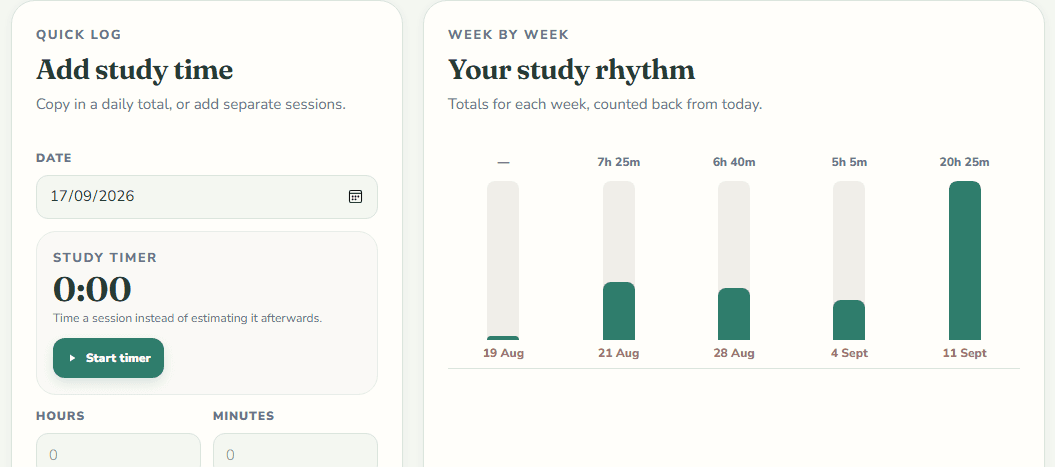
Log what you studiedThe minutes, and the spec points they covered. That one entry counts as the review as well — you are never recording the same work twice.
Step 3
Every point books its own next dateThe status you gave it sets how long it goes away for, and your syllabus percentage moves with it. Tomorrow's board is built by the time you close the tab.
Then it is step 1 again, on a board that has already counted what you did.
SYLLABUS GOALS
Finish the syllabus before the exam, not after it
Give it your finish date. It spreads what is left across the days you actually study, puts a date on every point, and says so when your plans together ask for more of the week than you have.
- How much is left, and how far ahead or behind you are
- Chapter-by-chapter milestones between now and the date
- Every plan you have, totalled against your week


EXAM PLANNING
Walk into each paper knowing you covered it
A mock in three weeks covers chapters 1 to 6, not the course. Tick what it includes and the run-up is built around that — and from 45 days out, the points on that paper are the first thing today's plan hands you.
- A countdown, and how ready you are against it
- The work still to do, spread over the whole run-up
- Every due row the paper covers carries the exam's name

STUDY LOG
Log it once, and everything else stays current
Put in the hours, tick what you covered. That one act marks those topics reviewed, books their next date, closes the session in today's plan, and moves your syllabus percentage. Nothing to keep in step by hand.
- Seven days, thirty, ninety, or everything you have logged
- Time a session with the stopwatch, or type the minutes in
- Where the hours went, by subject and by topic

GOOD DEFAULTS, YOURS TO CHANGE
Set a status. The next review is scheduled from it.
These are the intervals a new account starts with — real gaps, not an illustration. Mark a topic hard and its review comes forward; mark one easy and it goes back. And the gaps are yours to set: tighten them for an exam three weeks out, or loosen them for a slow burn — each status by hand, or from an Intensive, Standard or Relaxed preset. Change it and everything you have studied is re-planned, without a thing turning overdue.
| Status | Means | Comes back in |
|---|---|---|
| Not Started | Untouched | Due now |
| Learning | First pass done | 3 days |
| Practising | Working through questions | 7 days |
| Covered | Content complete | 10 days |
| Exam Ready | Confident under exam conditions | 14 days |


WHAT STUDENTS SAY
The best study app I have ever used.
Everything I need in one place.
AND THE REST OF IT
Everything else comes with them
A short walkthrough on every screen, naming the controls actually in front of you.
Reviews, deadlines, sessions and exam days in one month.
Decks scoped to a subject or chapter, with CSV import.
Homework and coursework, with a due date and a priority.
PDFs, slides and images, filed by subject and chapter.
Every review, session and paper, newest first.
Add, reorder, recolour or archive your subjects.
UPDATES
What's new in Momentum
What has changed since this page was last written, newest first. Everything here is already in the app, for every account.
- Multiple-choice practice that marks itself
An MCQ practice tile under Past papers: answer any chapter's multiple-choice questions one tap at a time, sit a timed set or a whole real Paper 1, and correct your wrong answers before you see them. Mistakes wait until you get them right, each chapter's share right shows where to work, and teachers can share a test by link and see every answer come in.
- Over a hundred more syllabuses arrive ready
The AQA, OCR and Edexcel A levels, every International A Level and the International GCSEs now arrive with their chapters and spec points already loaded, and Edexcel subjects carry the code printed on their specification. Type “edexcel physics”, “igcse maths” or “aqa biology” and the list narrows to that board’s version.
- Past papers for every Cambridge syllabus, and AQA, OCR and Edexcel’s
Nearly 17,000 more Cambridge IGCSE and AS & A Level papers, from 2001 to June 2026, and over 4,300 AQA, OCR and Edexcel ones, nearly every one with its mark scheme. AQA, OCR and Edexcel A level and International A Level papers show the grade boundaries each board publishes for them, and over 20,000 more papers say whether they were easy, medium or hard.
- Economics, Business and Music questions, part by part
Cambridge AS & A Level Economics and Business, and IGCSE and A Level Music, join the questions by chapter: each question with its mark scheme and the case study or printed music it needs, and every lettered part filed under the syllabus point it examines. Choose a point and every question with a part on it is listed. The points are a classifier’s proposals, and say so until a teacher has checked them. Music’s recordings are published nowhere, so its questions show what was printed.
- Past-paper questions, filed by chapter
A Topical tab under Past papers: Cambridge questions cut whole from the papers and filed under the syllabus chapter they examine, each with its own block of the mark scheme — and for multiple choice, just the letter. Star a question to keep it in your Saved list, with every filter still working on it.
- Build a mock from the chapters you choose
Pick the chapters, the number of questions and the time, and Momentum draws the paper. Sit it a page at a time against a clock, open any question’s scheme when you want it, mark it against the scheme, and save the paper or its scheme as a PDF at any point.
- The board opens on today's plan
Four counters, the day's work under them, and everything due for review folded behind one summary. Two links sit under the heading — today's plan, and everything due — and a three-step walkthrough teaches which is which. Both read the same points, so recording your work once updates both.
QUESTIONS
Before you sign up
What is Momentum?
A free one-stop shop for exam revision, for A Level, IGCSE, IB and SPM students. Pick your subjects and most arrive with your exam board's syllabus already loaded; from then on, everything is in one place: today's plan, cut to the time you have; a review board that brings each topic back when it is due; past papers from nine exam boards; past-paper questions filed by chapter; a mock exam builder; multiple-choice practice that marks itself, with tests teachers can share; syllabus goals and an exam planner; a study log with a stopwatch; grade targets; flashcards; tasks; a notes library; a calendar; and a history of everything you have done.
Which exam boards does Momentum support?
Cambridge International AS & A Level and IGCSE, the IB Diploma Programme, Edexcel International A Level and International GCSE, the AQA, OCR and Edexcel A levels, all 42 College Board AP courses, the SAT and the ACT, and all 95 SPM subjects. You can also add any subject of your own and paste or import its syllabus.
Does Momentum teach me the content?
Not the way a textbook does: there are no notes or videos in it. What it does have is past papers — questions from Cambridge, Edexcel, AQA, OCR, IB and SPM papers, filed by the syllabus chapter they examine, most with their mark scheme, to practise a topic on or to build a timed mock from. Keep whatever you already learn from — your textbook, your teacher's slides, a revision site — and let Momentum work out which of them you should have open tonight, and what your last paper says you got wrong.
Do I have to type my syllabus in?
No. Most subjects arrive with their full official structure already loaded — every chapter and spec point, in order. Anything without one can take a pasted outline or a CSV, and can be imported later.
How does the scheduling work?
It is deterministic, not a guess. Each status carries an interval — the sensible default, or a gap you set yourself, from a preset or one status at a time — a rating you give a topic stretches or shortens it, and a finish date or exam spreads the outstanding work across the days you said you study. Today's plan then takes what is due and cuts it to the minutes you have. The app shows you the rule it is following at every step.
What does it cost?
Nothing. Every account is free, with no limits on subjects, topics or papers.
Is my data private?
Yes. Every account is fully isolated — separate data, enforced in the application layer and again by database row-level security.
Does it work on a phone?
Yes. Momentum is a responsive web app, so it works in any modern browser on a phone, tablet or laptop. There is no native app to install.
Can I use Momentum in Malay or Chinese?
Yes. Every screen, message and walkthrough is written in English, Bahasa Melayu and 简体中文, and you can switch at the top of this page before you have an account. Syllabus content stays in the language your exam board printed it in, because that is the wording your exam will use.
Open the app. Work the list.
About a minute to set up. Pick your subjects, and the syllabus loads itself.
Free. No card, no trial, no limits.